The Clinical Manager allows you to set up a unique SIG code to correspond with each SIG code in the pharmacy information system.
The name of each SIG code in the Clinical Manager must be an exact match (including case) with the codes in the pharmacy information system.
Create or Edit SIG Codes
-
Select SIG Codes from the Clinical Manager menu tree.
-
Click New to create a new SIG code.
-
Click Edit to modify an existing SIG code.
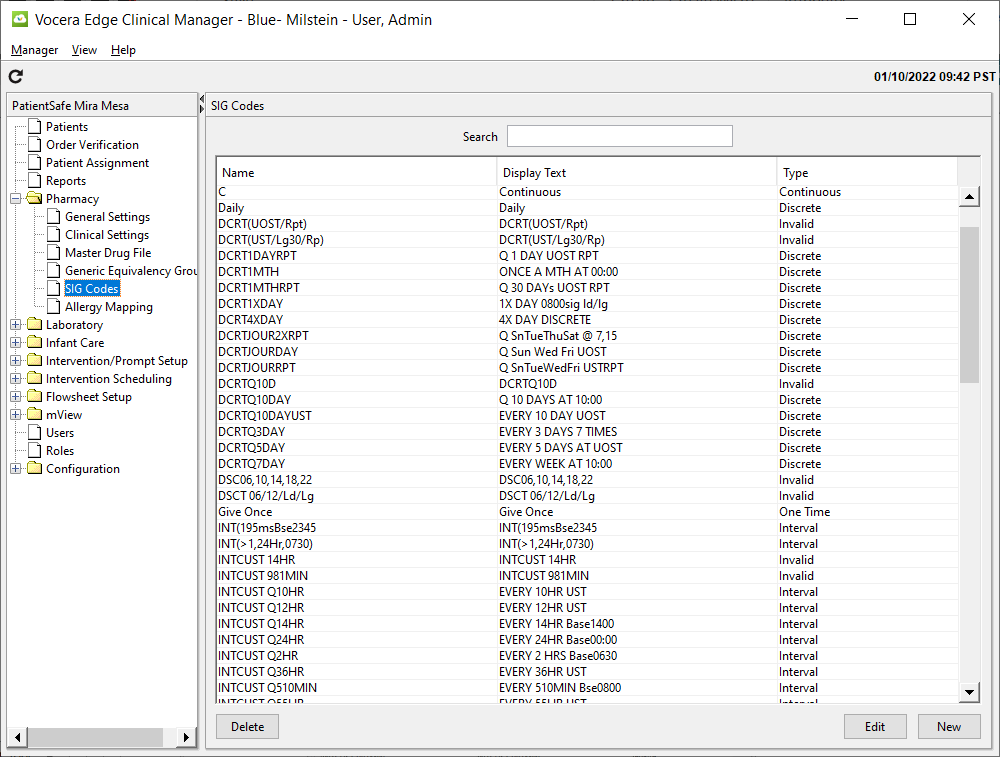
Every SIG code includes a Name (such as “BID”), which must match the name in the pharmacy system and Display Text, which is what appears on the handheld and on the MAR.
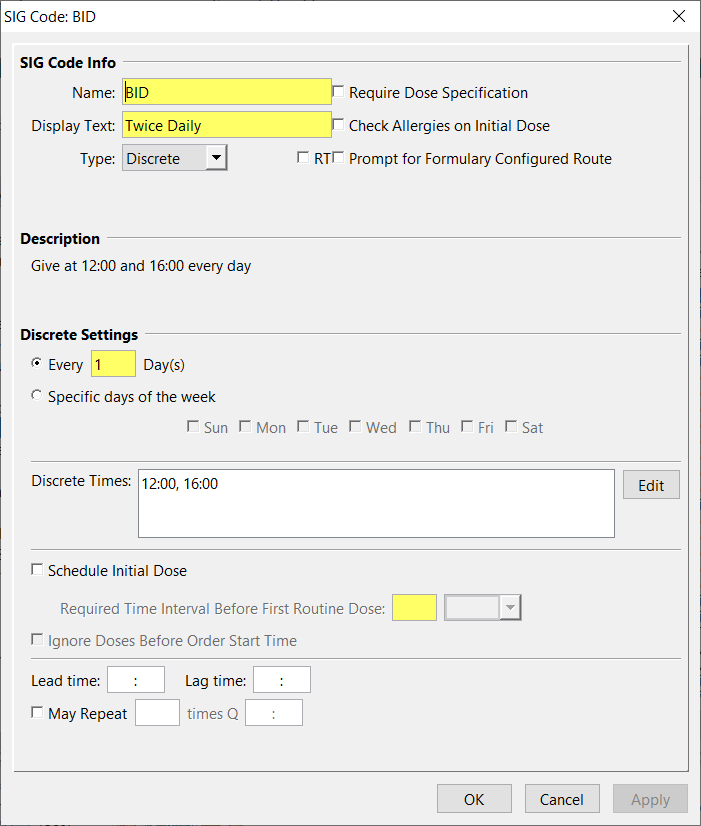
Selecting the Type of the SIG code determines what other options can be specified. The following types are available:
-
Discrete for doses administered at specific times of the day
-
Interval for SIG Codes with dose times at consistent time intervals
-
One Time used for orders to be administered only once
-
PRN for doses administered as needed
-
Continuous for meds given routinely but without specific dose due times (for example, an IV infusion)
RT
Check RT if you want users with the Respiratory Therapist privilege to see prompts and reminders for medication orders with this SIG code. If you check this option, the system also sends orders entered with this SIG code to the RT MAR Worksheet.
Require Dose Specification
In some cases, the Vocera Edge System will receive a medication order with a dose amount of “0” or with dosing units that do not match what is configured in the Vocera Edge System. In order to accommodate these order types, sig codes in the Vocera Edge System can now be configured to require the user to specify the dose amount.
Check Allergies on Initial Dose
When this setting is enabled, allergy checks will occur on the initial dose of an order using this SIG code. The user will be informed/alerted only if there is an identified allergy. Note: This setting is subordinate to the global "Enable Allergy Checking" setting. If the global setting is off, this setting will not be functional.
Prompt for Formulary Configured Route
When this setting is enabled, the user will be prompted for route using the formulary item's route settings, regardless of the route that is provided in the medication order. If the formulary item has only one route configured, the system will automatically use it and document against it. The route prompting will occur at admin details screens and the answer CAN trigger route based formulary prompting restrictions.
Lead and Lag Times
Lead and lag times determine the window of time before and after a scheduled dose during which a dose can be administered and still be considered on time.
Setting lead and lag times for a SIG code is optional. If you do set a lead or lag time for a SIG code, these settings will take precedence over the times set for the nursing unit, but are superseded by the formulary lead and lag times.
Discrete Dosing
For SIG codes that have hospital standard administration times, use the SIG Type Discrete.
To enter Discrete Dosing Times for a SIG code:
-
Choose the SIG Type, Discrete.
-
Check RT if you want users with the Respiratory Therapist privilege to see prompts and reminders for medication orders with this SIG code. If you check this option, the system also sends orders entered with this SIG code to the RT MAR Worksheet.
-
Enter the day interval. For example, enter 1 for a dose that occurs daily, 2 for every other day, etc.
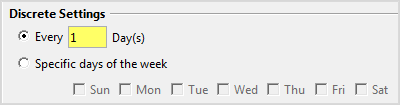
If dosing for this SIG will occur only on select days of the week, click Specific days of the week and choose the appropriate weekdays.
-
To select Discrete Dosing Times click Edit to enter the desired discrete times. Times can be indicated such as “0900, 1700” or just “9, 17”. Separate each time by a comma.
-
Select Schedule Initial Dose and enter a required time interval (minutes or hours) to have Vocera Edge schedule an immediate dose if the length of time before the first scheduled dose will be due is longer than the time interval specified. For example, if discrete times for BID are 0900 and 2100 and an order is entered at 1300 for BID with Schedule Initial Dose enabled and time interval set at 6 hours, an initial dose will be scheduled. However, if the time interval were set at 9 hours, an initial dose would not be scheduled.
-
Enter Lead and Lag Times for doses on orders with this SIG code if desired.
-
If the order can be repeated, such as with HSMRx1i, select the May Repeat checkbox and enter the number of allowable repeat doses, and the required interval between each dose.
-
Click OK to save your changes.
Interval Dosing
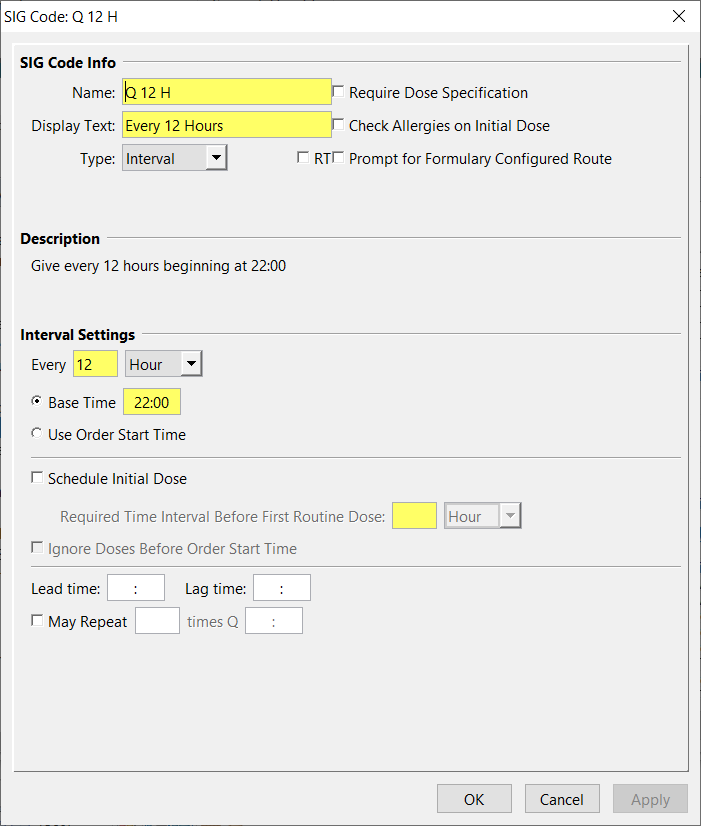
For SIG codes associated with scheduled time intervals in hours or minutes (such as Q 12 H), choose the SIG Type Interval.
To base the time of the first scheduled dose on the order start time, select the Use Order Start Time option. Otherwise, select the Base Time option, and enter a base time for calculating dosing times.
-
Select Schedule Initial Dose and enter a required time interval (minutes or hours) to have Vocera Edge schedule an immediate dose if the length of time before the first scheduled dose will be due is longer than the time interval specified. For example, if discrete times for BID are 0900 and 2100 and an order is entered at 1300 for BID with Schedule Initial Dose enabled and time interval set at 6 hours, and initial dose will be scheduled. However, if the time interval were set at 9 hours, an initial dose would not be scheduled
-
Enter Lead and Lag Times for doses on orders with this SIG code if desired.
One-Time Dosing
The One Time SIG Type designates a single dosing time and is based on the order’s start time.
To create a one-time SIG code:
-
Select One Time from the SIG Type drop-down list.
-
Select the Stat checkbox if SIG code will always be used for STAT orders. This will cause the order to appear in the STAT category on the patient’s medication order screen on the handheld.
-
Select the RT checkbox if this is a Respiratory Therapy SIG Code, if needed.
-
Enter specific lead and/or lag times as needed.
As Needed Dosing
For SIG codes that may be given as needed, with or without an interval, select PRN as the SIG Type and, optionally, designate a PRN Setting interval in hours or minutes. To provide a “lead time” for PRN dosing when a dosing interval is desired, use an interval that is slightly less than the actual dosing interval. This allows the nurse to be slightly early for a PRN dose without receiving a warning that the dose being given is early. For example, for “every four hours PRN” (Q4HP), use a PRN Setting interval of 220 minutes rather than 4 hours (240 minutes) to allow a PRN lead time of 20 minutes.
Select the RT checkbox if this is a Respiratory Therapy SIG Code, if needed.
Continuous Dosing
If a routine SIG code is intended, but specific dose due times are not applicable, use the Continuous SIG type. For example, you may want to use this type of SIG Code for IV infusions. Orders with a Continuous SIG type will be listed on MAR reports and shown on the handheld with Scheduled meds even though specific dose times are not applied.
Select the RT checkbox if this is a Respiratory Therapy SIG Code, if needed.