The following examples illustrate the settings for a variety of SIG codes.
|
Twice Daily (BID) A basic SIG code on a fixed schedule typically uses the hospital’s standard discrete dosing times. In addition to providing a name and display text for the SIG code, this example sets the following options: Every 1 Day indicates this is a daily SIG code. Discrete Dosing Times is selected, and the default times are used. In this case, those times are 09:00 and 21:00. |
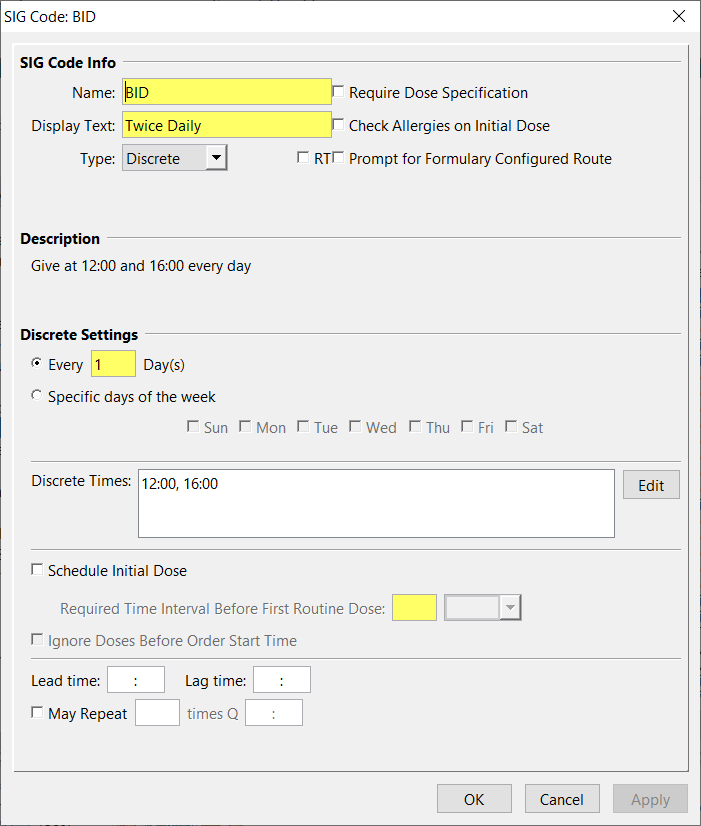
|
|
Every 4 Hours PRN (Q4H) In this case, to enter a PRN SIG Code for every 4 hours, select PRN from the SIG Type list and select the Every 4 Hours interval. This example uses the following options: PRN is used, so Discrete Dosing Times are disabled. Every 4 Hour is the minimum time interval in which the PRN dose may be repeated. (To allow a lead time for the PRN Setting, see As Needed Dosing.) Click Apply to add the SIG code to the list. Click OK to close the New SIG code screen. |

|
|
Every 12 Hours (Q12H) A SIG code with a daily dosing interval may be set up as a Discrete SIG and assigned specific dosing times. For example, even though a SIG Code of Q12H could be based on a 12-hour interval, discrete dosing times help caregiver’s better schedule the med pass and ensure that dosing times are always consistent. In addition to providing a name and display text for the SIG code, this example sets the following options: Every 1 Day indicates this is a daily SIG code. Discrete (Dosing) Times is selected, and the default times are used. In this case, those times are 09:00 and 21:00. |

|
|
Every 3rd Day at Discrete Time (Q72H) A Q72H SIG code would use the following options: Discrete is the SIG Type. Discrete Times indicates 09:00 as the designated dosing time. Every 3 Days indicates the time interval. |

|
|
Every 5 Hours (Q5H) If the dosing schedule is not divisible in a 24-hour period, set up the SIG code according to the following Q5H example: Interval indicates this is a specified interval SIG code. Every 5 Hours indicates the scheduled frequency. Use Order Start Time indicates when to start the dosing schedule. |

|
|
Every Hour (Q1H) If a particular interval SIG code has a short time interval setting, you should consider shorter lead and lag times for this SIG code. In this example, the SIG code dosing time interval of 1 hour is the same or less than the hospital's standard lead and lag time of 60 minutes. The SIG lead and lag times can set at 30 minutes each to avoid overlapping the lead and lag period for consecutive doses. Use Order Start Time indicates that dose scheduling will begin at the Pharmacy order’s start time. |

|
|
One Time Only (Once) “Once” is an example of a one-time SIG Code. In this example, the dose time will be the particular order’s start time and the lag time is set at 4 hours to allow the caregiver ample time in which to administer the dose. A lead time and lag time can be designated for a One Time SIG code. However, if the SIG were only used for immediate One Time doses, only the lag time would apply. |

|
|
Specific Days of Week (MWF) It is common for some medications to be ordered for specific days of the week, as illustrated in the following MWF SIG Code. In this case, set the following options: Discrete is the Type. Discrete Times is specified as 09:00. Specific days of the week is selected for Mon, Wed, and Fri. |

|
|
May Repeat (KCLIV) Some orders, such as a Potassium Chloride IV protocol, use a May Repeat option, so the dose may be divided as clinically indicated among several intervals. For KCLIV, the options are: Discrete is the SIG Type. Discrete Times with the time set to 09:00. Every 1 Day indicates this is a daily SIG code. May Repeat 5 times Q 01:00 indicates the interval at which the dose may be repeated. |

|
|
Continuous Orders with this SIG Type appear in the scheduled medication section on the MAR Worksheet and MAR. There is no interval and no dose due times, so doses can be scanned and administered at any time. No alerts or warnings regarding dose times will occur. Select the Continuous SIG Type. |

|