Security Assertion Markup Language (SAML) provides a way to send information from an Identity Provider (IDP) service to one or more servers or applications. SAML enables Single Sign-On (SSO) capability: an end user only needs to provide a username and password once to access multiple services.
SAML support in Vocera Engage requires the installation of a Vocera SAML Adapter that provides the interface between the Vocera environment and your implemented identity provider service, such as Microsoft Azure, WorkspaceOne, or Okta.
How Vocera Engage deploys a SAML environment:
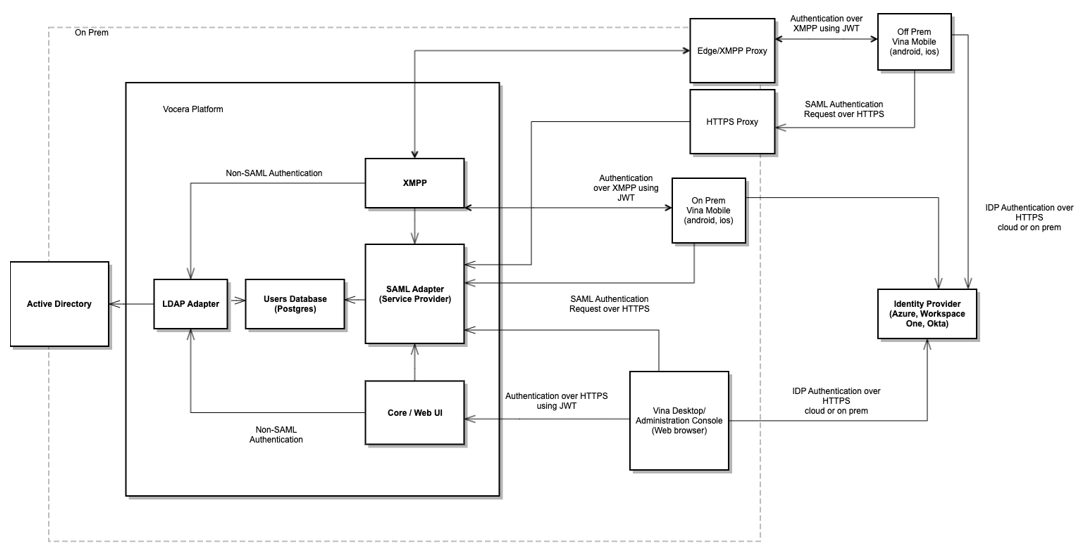
The Vocera SAML Adapter uses a secure HTTP URL to complete the sign-on process. This means that if you have deployed SSO n and you want to allow Vocera Vina users to log in when off premises, you must allow external access to the URLs that the Vocera SAML Adapter uses.
To make allowing this external access easier, all URLs that need to be made externally accessible for the Vocera SAML Adapter contain the path element /vocera. For example, the SAML authentication URL for remote single sign-on is https://yourdomainname/vocera/SAML/authenticate.
To ensure that all URLs that contain /vocera are allowed access, configure your Application Delivery Controller (ADC) software (for instance, F5 or Netscaler) to act as a reverse proxy server that forwards these URLs to the Vocera Engage server.
For example, suppose that a cluster of Vocera Engage servers is installed, and is accessible by the Fully Qualified Domain Name (FQDN) of vina.hospital.org. Their Domain Name Server (DNS) supports an external proxy, so it has an external DNS entry that points to their ADC software. This ADC software then needs to be configured to act as a reverse proxy that forwards all URLs that start with https://vina.hospital.org/vocera/ to the Vocera Engage server cluster.
If no IDP is available, and a Vocera LDAP Adapter has been defined, the LDAP-based directory is used for authentication. If no Vocera LDAP Adapter exists, or the login request is specified as local, a login screen displays that asks the user to provide a username and password.