You may see error messages that display at the top of your screen indicating a lost connection. These error messages are color coded for your convenience:
Red: indicates a major error
Yellow: indicates a transition or recovery process
Green: indicates a recovery success
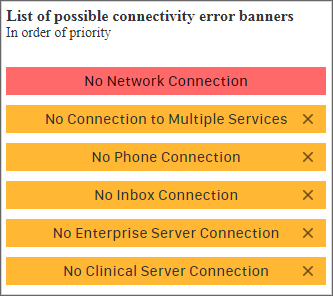
No Network Connection
You receive this message when the Wi-Fi gets disconnected and you are in the Vocera Edge application. Please make sure you are in an area with adequate reception and network connections are enabled.
No Connection to Multiple Services
Messages and notifications cannot be received or sent.
Unable to get contacts and assignment information.
Contact the administrator if issue persists.
No Inbox Connection
Messages and notifications cannot be received or sent.
Contact the administrator if issue persists.
No Org Server Connection
Unable to get contacts and assignment information.
Contact the administrator if issue persists.