To troubleshoot multicast issues, multiple configurations must be examined on the wireless controller, switches, and routers.
Most multicast issues are caused by not having PIM set up correctly on the network. The following are two ways to troubleshoot this:
Check all the VLANs where the multicast traffic traverses.
Check to see if the "Join Messages" are being recorded on the router and switches.
To verify that "Join Messages" are making it through the network, do an SSH to all routers and switches in the path and make sure "Join Messages" from the clients are seen. If there is a router or switch that is missing "Join Messages", that device might be the cause of the issue.
If the devices are having issues with multicast packets, verify that IGMP snooping is set on the switches. To verify if IGMP snooping is enabled on the switch, run the following command:
show ip igmp snooping
If IGMP snooping not enabled on the switch, enable it globally by issuing the following command:
ip igmp snooping enable.
After enabling IGMP snooping globally, it needs to be enabled per VLAN. Enable IGMP snooping on a VLAN 2 by issuing the following command:
ip igmp snooping vlan 2 enable.
Another common issue is multicast packets getting stuck at the core. If the multicast packets flow over the core, make sure the VLAN of the EtherChannel/Port-Channel has PIM enabled on them. There have been cases where one EtherChannel had PIM enabled and the other EtherChannel did not. This causes one multicast session to work and the next multicast session to fail.
After checking the VLANs for PIM and checking to see if the messages traverse the network, the next settings to check are DTIM, TKIP, RP, multicast buffering, and roaming.
Checking Routing Tables
It is important to remember that the Multicast traffic takes the same path as all routed traffic from the RP to the device's local router. When you do a traceroute from the RP to the devices, it gives you the route the multicast traffic (or any traffic) takes from the RP the devices. Do an SSH into every router on the path and verify multicast routing is set up correctly on all the routers and verify PIM is set up on the right VLANs and interfaces.
The following is an example of a traceroute command issued on a lab environment:
R1#traceroute 172.16.0.2
Type escape sequence to abort.
Tracing the route to 172.16.0.2
1 10.0.0.1 0 msec 0 msec 0 msec
2 192.168.5.2 0 msec 0 msec 0 msec
3 172.16.0.2 0 msec 0 msec 0 msec
Using this list, do an SSH into all the three routers listed; 10.0.0.1, 192.168.5.2, and 172.16.0.2. Verify multicast routing is set up correctly on all the routers. Also, verify if PIM is set up on the right VLANs and interfaces.
Controllers Special Path for Multicast Traffic
When working with CISCO Controllers, it is important to remember the method by which multicast traffic is managed and the unique paths it follows. When analyzing IGMP packets, keep in mind that Wireless LAN controller is a layer two device. When the controller receives an IGMP "Join Message" from the client, the controller sends the IGMP "Join Message" to the local router, but changes the device's IP address to its IP address that is in the same VLAN as the devices. The controller updates its MGID table, which contains all the devices and the multicast groups they have joined. The controller sends this updated MGID table to all of its APs.
When the controller receives a multicast packet from the wireless network, it makes two copies and sends one copy to its local router (First Hop Router – FHR) and the other to all the APs (encapsulating it in the Controller's multicast address).
It is very important to note that the first packet from the source must hit the RP and be routed back to the Controller. The local router (FHR) checks if the source and destination are on the same VLAN and the FHR sends the multicast packets back to the controller.
Checking the DTIM Values
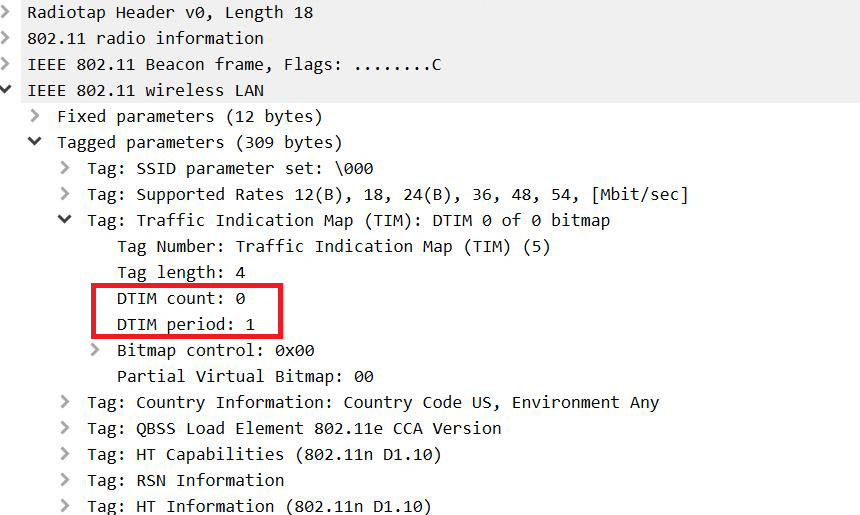
DTIM must be set to 1 if multicast is used for voice. You can verify this setting on the GUI of the controller, in the Controller config file, and through a wireless capture.
The DTIM will be in the beacons of the wireless capture under the Traffic Indication Map If DTIM count is set to 0. If the DTIM period is set to 1, then the next beacon will also be a DTIM beacon as you can see in the following example:
Checking the Multicast Buffer
If there are higher DTIM values (which causes the AP to hold on to multicast traffic for longer periods) and the network experiences a high volume of multicast traffic, the badges may experience issues where some multicast packets are being dropped. This may be caused by the multicast buffers being over-run. Each radio can handle 50 multicast packets at any given time. These are shared equally across all SSIDs.
To verify the multicast buffers, issue the following command:
show controller dot11radio0 | begin --\ In-Prog (see Appendix B for more details).
To enable the WLAN to use more than 50 multicast packets at a time, issue the following command:
config wlan multicast buffer enable (30-60) <wlan-id>.
This increases the multicast buffer size and allows the AP to hold on to more multicast packets.
Checking if TKIP is Enabled
Even though TKIP has been deprecated, it may still be present in the customer's network. If TKIP and AES are on the same SSID, the multicast traffic is sent out with TKIP. If the devices are expecting AES, they can decipher the multicast traffic and discard the packets. This can be checked either on the GUI of the controller, the controller config file, or in the beacons of a wireless capture. The following image shows AES in the Pairwise Cipher suite list. If TKIP was enabled, you would see it in the same section.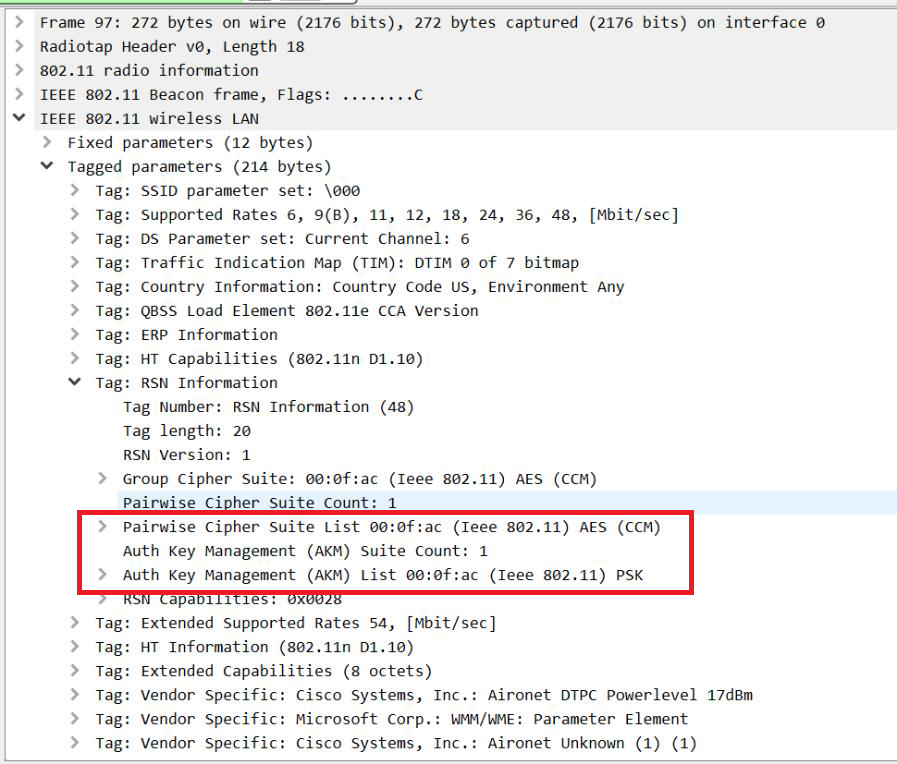
Checking RP
Multiple RPs can cause issues with multicast if you have devices on multiple VLANs, and each local router is contacting a different RP. This causes the devices on one VLAN to get the multicast traffic and the other devices on a different VLAN never get the multicast traffic. If there are two RPs, ask the customer to remove one of the RPs.
Issues with Roaming
Roaming can cause issues with multicast especially if the client fails to send a new "Join Message" after each roam. This issue is more common with Autonomous APs but could be seen in the cloud-based APs as well. CISCO controllers prompt the client to send a "Join Request" or they send a new "Join Message" on behalf of the client after a roam. In Autonomous APs or even cloud-based APs, if a new "Join Message" is not sent and IGMP snooping is enabled on your switches, the multicast packets might get delivered to the wrong AP.