Learn to configure an inbound connection using Groovy and a TCP Socket.
Inbound processing refers to responding to an incoming HTTP, WebSocket or TCP request. The adapter delivers each inbound payload to the adapter as a string and the adapter returns a response. The inbound processing is designed to handle the approved use cases.
In order to implement inbound processing an inbound processing script must produce an instance of an object that implements the com.vocera.interfaces.scripted.processor.InboundProcessor interface or a class definition that implements the interface. The same instance will be used for all data frames arriving on the connection so be careful with managing state stored in your script (avoid storing any state except in the provided cache to avoid race conditions in your script). Multiple clients can cause input processing to occur simultaneously.
Select an empty field and begin typing, or select an existing value and type over it. To keep an existing value, do not edit that field.
- Access the Vocera Platform Web Consoleand navigate to the adapters. See Navigating the Vocera Platform Adapters for instructions.
- Select New Adapter in the Action menu, or select an adapter you wish to configure and then select Edit, to display the configuration fields. The configuration fields are the same for new and existing adapters.
- Navigate to the New Adapter option, or navigate to an existing adapter to edit. See Creating a New Adapter and Editing an Adapter for instruction as needed.
- Complete the configuration fields as described in the table.
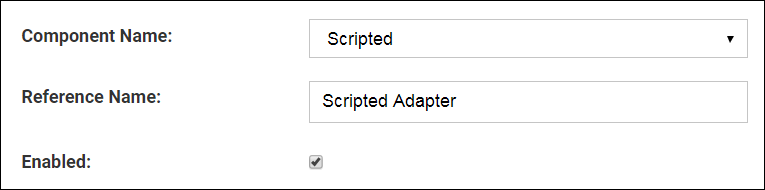
| Configuration Fields | Description |
|---|---|
| Component Name | Click the Component Name field to display a list of the systems and devices that the Vocera Platform currently supports. Select the name of the adapter to create. |
| Reference Name | Enter a short descriptive name in the Reference Name field to uniquely identify an adapter instance. It may demonstrate the adapter function or other information; for example, Production adapter may differentiate a live adapter from a development or "sandbox" adapter. |
| Enabled | Select the Enabled checkbox to allow the Vocera Platform to use the new adapter. The Vocera Platform ignores the adapter if this option is disabled. |
- To process a script with an inbound protocol, complete the Script Language, Inbound Protocol, TLS, Inbound Port, and Message Timeout .
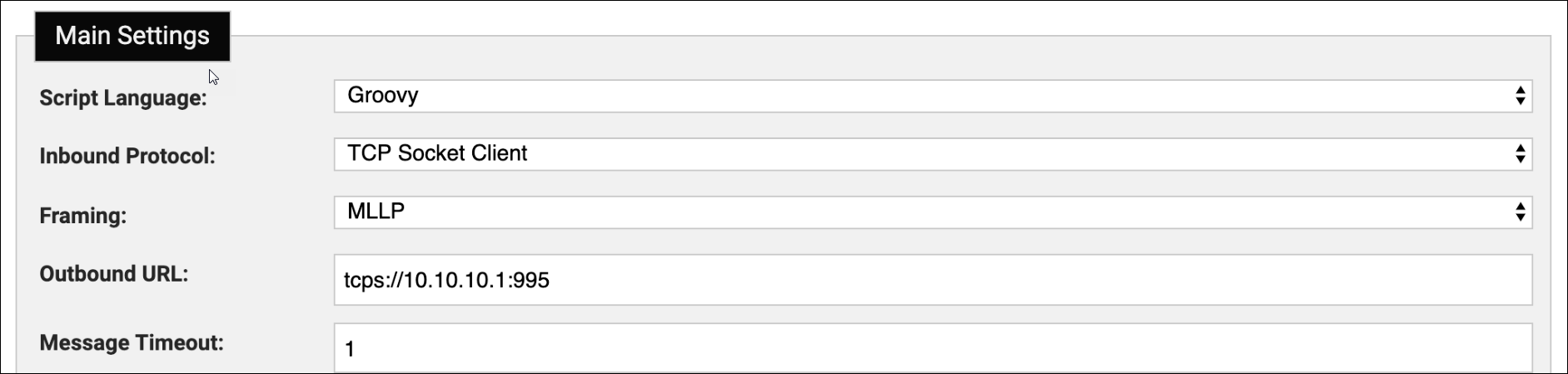
| Configuration Field | Description |
|---|---|
| Script Language | The scripting language used by the scripts in this adapter instance. Currently Groovy 2.5.7 and JavaScript (the version supported by the platform JVM, currently the Nashorn implementation of ECMA - 262 Edition 5.1) are supported. |
| Inbound Protocol | The protocol the adapter will use to listen for incoming messages. One of None, HTTP, WebSocket, TCP Socket, WebSocket Client, TCP Socket Client. In HTTP, WebSocket and TCP Socket the adapter is acting as a server waiting for connections from a client. For WebSocket Client and TCP Socket Client the adapter is continually trying to make an outbound connection. |
| Framing | When the inbound protocol is TCP the adapter needs to know how to break up incoming messages. One of MLLP, XMP, JSON, Line. When using MLLP the adapter will add the appropriate frame markers for return messages. For the other framing options the script must format appropriate XMP, JSON or add a newline respectively. |
| Outbound URL | The outbound URL to connect to when acting as a WebSocket or TCP client. For a WebSocket client, must be a valid URL for ws: or wss: scheme. For a TCP client must be a URL of the (non-normative) form tcp://<host>:<port> or tcps://<host>:<port> for TLS. |
| Message Timeout | The amount of time, in minutes, that is expected to elapse between messages. The value must be a number between 1 and 10000. An audit event (610) will be generated if a message is not received when expected. |
- Complete the Inbound Processing and Start/Stop fields as described in the table.

| General Settings Configuration Field | Description |
|---|---|
| Inbound Processing | Code that implements an instance of the Inbound Processor interface. Invoked on input. |
| Start/Stop | The adapter supports an optional Start/Stop script. The script must implement the Scripted Lifecycle interface given here. This provides an opportunity to run a script before any inbound processing starts or rule fires. The start method is run after the scripts successfully compile but before the inbound connection is started. The script is allowed to overwrite properties on context.scriptedConfig. These aren't persisted, but are used by the inbound connection set up. So for example a web call could be made to an external service to get the current WebSocket connection URL and the script can set context.scriptedConfig.outboundURL. |
- Select one of the available options to exit the adapter configuration
page. See Saving an Adapter for details.Note: If installing on Engage 5.5.4 or higher, the appliance MUST be restarted for the adapter to take effect.